Sunday, 27 January 2013

TomTom Battery Replacement - What Screwdriver to Open?

How to Replace the Battery in a Tom Tom 510 Sat Nav


What Screwdriver do you need to undo screws on a TomTom 510 SatNav?

If your TomTom has stopped working and doesn't hold any charge the chances are that the battery has failed and needs replacement. Our TomTom 510 wouldn't turn on anymore but had previously not lasted very long without being connected to mains power so I thought the battery might be a cause. Checking online it seems that the battery in a Tomtom can last for around 2 years so the 6 years we got from ours was good going!

The price of the TomTom battery on Ebay was £8 and the screwdriver head was £2.50 so for a total outlay of £10.50 we now have a working SatNav and have saved the £100+ cost of a new one!

This guide is an excellent and detailed instruction on how to replace the battery in a TomTom 510 satnav but also should cover other TomTom devices like the 520,710,720 etc.

The only items that I found missing from the guide were to explain that you needed to remove the SD card before starting (found out the hard way!) and which screwdriver you need to undo the screws to open the TomTom up.

Consulting my local hardware store, the excellent Johnsons of Rainham, I was able to determine that the screws needed a T-6 Torx screwdriver to remove them. The cost of this was £2.50 but compared to the hassle the writer of the TomTom battery replacement guide above had it was a doddle to remove the screws and no problem at all to replace them without any of the injuries to the hands that they received.

There are 12 different screws including the 4 on the outside case so it is well worth investing in a proper tool to open them rather than modifying a philips or flat head screwdriver.

What Screwdriver do you need to undo screws on a TomTom 510 SatNav
T-6 Torx Screwdriver to undo screws on a TomTom 510 SatNav
T-6 Torx Screwdriver to undo screws on a TomTom 510 SatNav
T6 Torx Screwdriver to undo screws on a TomTom 510 SatNav

Saturday, 26 January 2013

Whos On Heart Wrong Answers - Incorrect Guesses for 2013 - Voices for 2014

Whos On Heart  Competition 2014 - Name these Voices


The Whos On Heart competition is running again for 2013. You can hear the 3 voices saying "Whos" "On" "Heart" here. http://www.youtube.com/watch?v=G_IjTboCMCw

The prize for guessing all 3 secret celebrities is £125,000 so it is a massive jackpot to win!

Click here to Search List of 2013 Whos On Heart Guesses

Eventually Heart will start to show the wrong answers on their website but in the meantime post the wrong answers as replies here and we can build up a list of who has already been guessed for the Who's On Heart Competition.

The first TWO names have now been guessed - David Duchovny and Jamie Bell. I'm certain that the third name is Dido so if it wins you £125,000 please share some!

Thursday, 10 January 2013

Oracle Apex Error - Application alias Cannot be converted to unique application id

The Oracle Apex Error  message "application alias can not be converted to a unique application ID.Contact your application administrator" can be encountered if you have the same application alias used on multiple APex Workspaces on the same Apex server.

Apex prevents you using the same Apex Application alias more than once in the same workspace on the same server but doesn't prevent the same alias being used on different workspaces. To check that the application runs correctly use the URL with the application ID not the alias and the app should run without any issues.

If you receive this error then it means another developer has used the same alias on a different workspace on the server. The app runs correctly with the application alias if you are logged into apex admin as you have already specified the Workspace to use. When not logged in the URL must determine which workspace the app relates to.

When the Apex application alias is translated into an application ID it cannot find a unique Id that matches the alias so returns the above error.

The solution to fix the Apex Error message "application alias can not be converted to a unique application ID.Contact your application administrator" is to rename the application alias on one of the applications so that the alias is unqiue on the server. Once this is done then the APex application will run correctly.

Tuesday, 8 January 2013

How to Set Field to Uppercase in Oracle Apex

I needed to get a field set to uppercase in Oracle APex (Application Express) so that when a user types into the field any letters entered are automatically converted to capitals.

What appeared to be a tricky task was actually very simple!

All you need to do it to enter the following code into the item element field.

onchange="this.value = this.value.toUpperCase();"

With this code, the user can type into the field in upper or lower case but as soon as they leave the field the content will be converted to capitals / upper case.


How to Set Field to Uppercase in Oracle Apex


The screen shot below is taken from an Oracle Apex 4.2 installation so may look different in other versions.

Wednesday, 2 January 2013

VW Golf Radio MP3 Iphone Adapter - Play MP3 Music via Gamma Radio

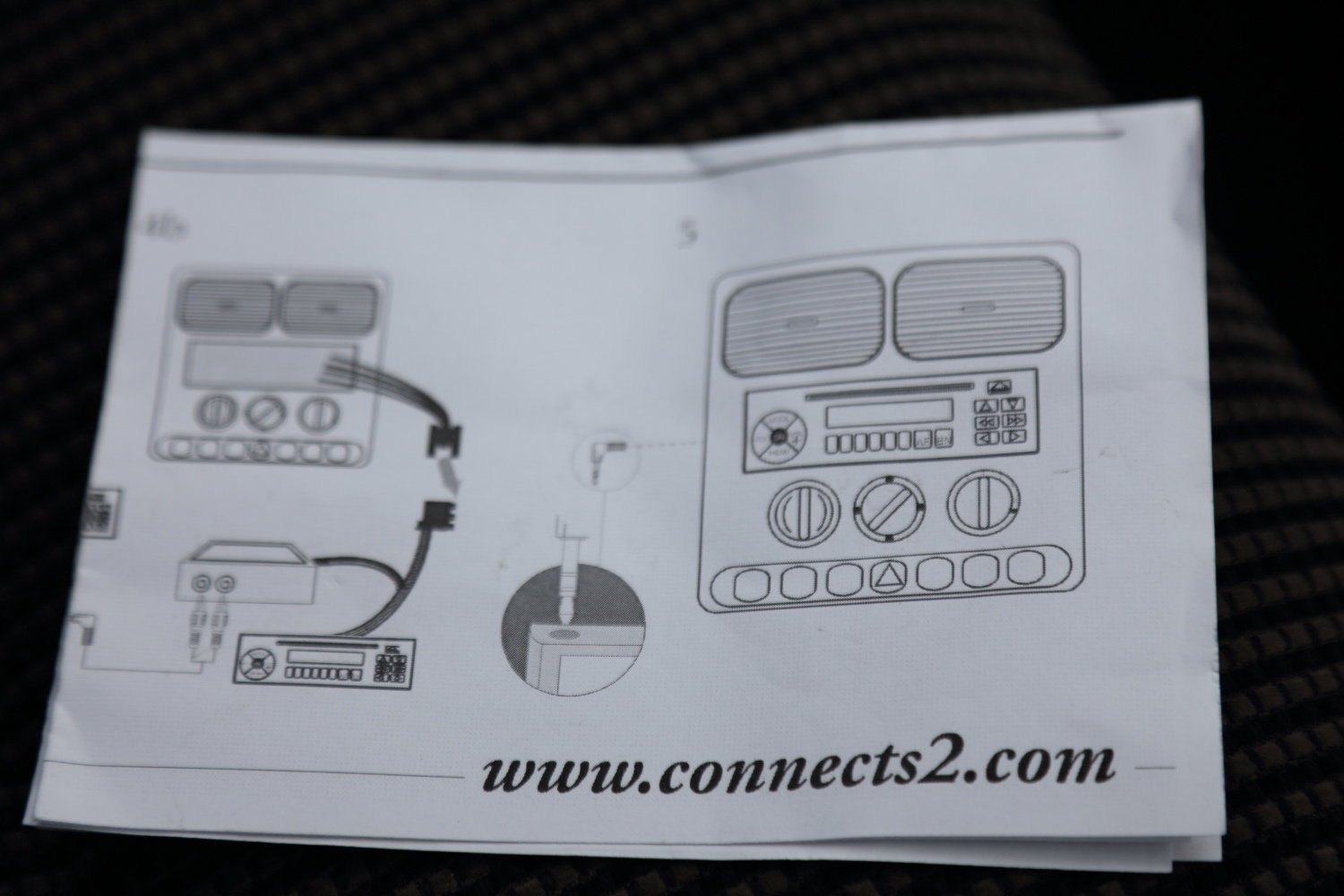
Do you have a VW Golf Gamma Radio and want to play music from your iPod, MP3 player or Iphone through it using a 3.5mm jack socket adapter?  How to Play MP3 Music via VW Gamma Radio

 
You can buy an attachment that clips into the rear harness of the VW Gamma radio and replaces the output from the CD player so that when you switch to the CD player the line source is played through the radio speakers. I've had this fitted for a few weeks now in my VW Golf Mark 4 and it is fantastic. The fitted CD player was only intermittently working and the radio transmitter iPhone adapter was patchy with interference in many places on my journeys.
 
 
Do you have a VW Golf Gamma Radio and want to play music from your iPod, MP3 player or Iphone through it using a 3.5mm jack socket adapter?

Do you have a VW Golf Gamma Radio and want to play music from your iPod, MP3 player or Iphone through it using a 3.5mm jack socket adapter?

Connects2Adapter Mp3 ipod on VW Gamma radio


Control box for iphone, mP3, iPod adapter for VW Golf radio


How to fit a Control box to play iphone, mP3, iPod adapter for VW Golf radio
Control box & leads for iphone, mP3, iPod adapter for VW Golf radio


3.5mm jack socket allowing music to be played through the VW Golf Gamma radio
This is a similar adapter for VW Golf Mark5 Radio MP3 Iphone Adapter
http://www.ebay.co.uk/itm/VW-GOLF-AUX-IN-INPUT-ADAPTER-INTERFACE-CABLE-LEAD-CAR-RADIO-IPOD-MP3-3-5MM-JACK-/360549569833?pt=UK_In_Car_Technology&hash=item53f26dd529

Thursday, 27 December 2012

Do you pay Import Duty Buying from SLR Hut? How Much Are Customs Taxes with SLRHut?

How much is Import Customs Duty with SLR Hut? How Much Are Customs Taxes with SLRHut?


Do you pay Import Duty Buying from SLR Hut? How Much Are Customs Taxes with SLRHut?
Do you pay Import Duty Buying from SLR Hut?
How Much Are Customs Taxes with SLRHut?

Despite the .co.uk domain name SLR Hut is based in the USA so any goods ordered from them are liable for import duty consisting of VAT at 20% plus Customs duty. It has been reported that SLR Hut illegally declare extremely low values for goods they send to the UK in order to evade UK taxes and duties.

If you are caught with packages that have been declared of low value but are actually worth more then you could be liable for the additional VAT and duty that has been underpaid. Even if the value is declared low then you are still obliged to pay the duty and handling fee for the goods before you can receive them.

As an example we ordered some equipment costing £160 from Hong Kong and the duty including the shipping agents charge was £35 on top of the cost of the goods. It also appears that SLR Hut will sell you overpriced accessories and warranties which make their prices no cheaper than the goods you can buy in the UK without the same pressure selling techniques or hassle of ordering from abroad.

Monday, 10 December 2012

Facebook Website Down 10 December 2012? Facebook DNS look-up failed

Looks like the Facebook website is currently down as of 10 December 2012. All other websites I use  are ok but Facebook is currently showing the following message on Internet Explorer

Internet Explorer cannot display the webpage

and on Google Chrome the message given is:

This web page is not available


How to fix "Facebook DNS look-up failed" error

Unfortunately as the DNS look-up failed error is due to a problem with the Facebook servers then there is no fix you can use on your PC to resolve it. As mobile devices can sometimes use different methods and routes to access Facebook you may be able to connect using your cellphone/mobile phone or iPhone/iPad with the Facebook app instead.

Facebook Error Messages 
The server at www.facebook.com can't be found because the DNS look-up failed. DNS is the network service that translates a website's name to its Internet address. This error is most often caused by having no connection to the Internet or a misconfigured network. It can also be caused by an unresponsive DNS server or a firewall preventing Google Chrome from accessing the network.

Facebook Website Down 10 December 2012? Facebook DNS look-up failed

This follows an outage on Google's Gmail service earlier today when the email platform used by millions worldwide was unavailable for around 15 minutes from 5pm GMT.

Previously this message has occured when Facebook's server database has failed meaning the servers controlling internet traffic lookups are unable to connect to it

This problem can be caused by a variety of issues, including:
  • Internet connectivity has been lost.
  • The website is temporarily unavailable.
  • The Domain Name Server (DNS) is not reachable.
  • The Domain Name Server (DNS) does not have a listing for the website's domain.
  • There might be a typing error in the address.
  • If this is an HTTPS (secure) address, click Tools, click Internet Options, click Advanced, and check to be sure the SSL and TLS protocols are enabled under the security section.