Monday, 16 February 2026

Oracle Apex Email Stops Sending via Gmail SMTP Relay Jan 2026

We send a lot of emails from our various Apex applications and as of late January 2026 these emails have stopped sending. There is no error message shown, the Apex mail queue just builds up with messages waiting to send. There are various posts online about Gmail implementing additional security but no definite answers as to why Apex has suddenly failed to send out the Oracle email queue.

There is a post on an Oracle forum from another user that has the same issue and an Oracle Apex developer has posted that it has been identified as a bug and needs to be patched. This is apparently a level 3 bug so might take a while to resolve but unfortunately isn't listed on the Oracle support website so we still don't know what the bug is.

https://forums.oracle.com/ords/apexds/post/apex-mail-gmail-custom-smtp-host-and-ehlo-2004

The Oracle Bug ID is 38950783

In the meantime we've switched to using Mailgun for our Oracle Apex emails which is working fine. We already had an account with Mailgun as we use it for our website so it was an easy transition.

Tuesday, 25 November 2025

Oracle Apex Classic Report Not Refreshing from Dynamic Action Dialog Closed

 I've had this issue previously where the data in a classic or Interactive report on the same page as a Form disappears after the data in the report is edited. After searching around for ages I finally found the issue and it's nothing to do with the report or the dynamic action!

If you have reports on a page that you want to refresh you need to ensure that the Session state of the Primary key of the form on the page is set to Per Session (Persistent) rather than Per Request (Memory).

Oracle Apex Classic Report Not Refreshing from Dynamic Action Dialog Closed

Change this value and the dynamic action will now refresh the data in the report!

Oracle Apex Classic Report Data disappears from Dynamic Action Dialog Closed

https://stackoverflow.com/questions/65327945/oracle-apex-20-interactive-report-not-showing-any-rows-on-refresh

Wednesday, 24 August 2022

Carbon Black Update Causes BSOD Windows 10

 Our company is one that uses VMWare Carbon Black as a security product. As of around 1520 on 23rd August 2022 devices around the company started crashing and then failing to start up with the Windows Blue Screen of death (BSOD). Despite repeated reboots the laptops were stuck in an endless reboot loop getting into the Windows desktop before then crashing.


The error given was PFN_LIST_CORRUPT

Monday, 4 April 2022

Oracle Apex View Clob File - Error on Google Chrome

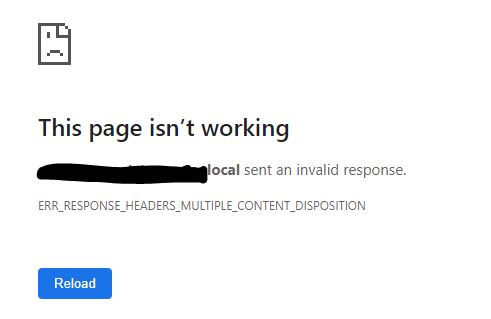
I had an Oracle Apex application error reported by a few users that were unable to view a file loaded into one of the applications. Originally it only appeared to be PNG files that were affected but later it was clear that it impacted any type of file. When you clicked to view/download the file that had been stored as a Clob in Oracle there was an error page shown with the message

<ServerName> sent an invalid response.

 ERR_RESPONSE_HEADERS_MULTIPLE_CONTENT_DISPOSITION

On further investigation it appears this is a known issue with Google Chrome and not a specific Oracle Apex error. There are various characters that can cause the error if they exist in the file name of the file you are handling such as commas, quotes etc.

I've now put a DB trigger to rename any files to remove characters that could cause a problem so that users don't need to worry about renaming themselves.


Tuesday, 12 January 2021

Adobe Flash EOL Fix Blocked Applications Jan 12 2021

 Adobe Flash was made End of Life (EOL) at the end of December 2020 but Adobe gave users a short period of grace until turning the product off on 12 January 2021. As of today any websites will no longer be able to play Adobe Flash content as it is blocked by Adobe.

You can view a video of the steps here


However there is a way to still run Flash applications if you have access to Internet Explorer 11 and haven't applied the patch to remove Flash (KB4577586) We have successfully used this method to reactivate one of our applications that relied on Flash based graphs and had stopped working on Jan 12 but users are now able to access again. Bear in mind this should only be a temporary fix until you can rewrite the code, using Flash is not a long term solution. You need to create a file called MMS.cfg. Within the file you need to specify the domain and port that your flash application is running on, for example
https://https://www.bbc.co.uk/:80. This is the website/domain for your website that you need to enable flash to work on.

The port number for standard websites is 80 or 8080 but if you have access to your webserver you should be able to check the number in the configuration. For my application it was port 7777 but that was part of the URL I need to enter to access the site so fairly obvious. 
Other parameters in the file I used are as below:

EOLUninstallDisable=1 AutoUpdateDisable=1 EnableAllowList=1 AllowListURLPattern=https://www.bbc.co.uk/:80 The file mms.cfg needs to be copied to the following 2 locations: C:\Windows\SysWOW64\Macromed\Flash C:\Windows\System32\Macromed\Flash Do not install this optional Microsoft update KB4577586: https://www.catalog.update.microsoft.com/search.aspx?q=4577586

Monday, 14 December 2020

Oracle Apex Form Download File link error - Server sent an invalid response.

I had the following problem reported by a user of one of my Apex applications when they were trying to download an attachment that had been added to a record as a clob using the built in functionality for Apex clob form fields. The error message wasn't very informative and gave "server name sent an invalid response."

The issue seemed to be that the file name the user was adding included commas in it which is obviously allowed in Windows but maybe not in other system processes. Once I removed the commas the download worked fine again.

In order to remove unwanted characters in file names I added the following code to the insert trigger on the table to automatically update them

-- Check and update Filename remove unwanted characters 

--*****************************************************************************

       :NEW.FILE_NAME := REPLACE ( REPLACE ( REPLACE ( :NEW.FILE_NAME, CHR(44), NULL ), CHR(59), NULL ), CHR(39), NULL ) ;   


Oracle Apex Form Download File link error - Server sent an invalid response.


Monday, 7 December 2020

SecureDoc Password Different Windows 10 After Change

 SecureDoc is used to protect laptops so that the disc is encrypted before logging into the operating system. I have Windows 10 on my laptop and normally it's a seamless process to log in where you enter your credentials to SecureDoc on startup and this automatically logs you in to Windows.

However there seems to be an issue when Windows requires a password change and SecureDoc doesn't seem to be able to cope with this so you end up with the situation of needing a different password for SecureDoc to the one used for Windows and need to enter 2 different passwords.

The SecureDoc website is useless for finding information about this and doesn't have any support info - I guess because they expect support to be done by company helpdesks.

The answer seems to be to log in to the SecureDoc control center on your laptop once it has booted into the Operating System. Select the menu option to Communicate with Server and this appears to resync the password between Windows and SecureDoc. I don't know if the same process works for MacOS but it might be worth a try if you find that your password no longer matches SecureDoc.