Musings, tips and hints about computing, mobile phones and general technology comments. Help and advice about the latest virus and malware as well as ways to avoid Trojans that will steal your online banking details. As soon as we spot a new scam/virus email then we post it here to warn others about them.
Sunday, 26 July 2026
Fake Grand Piano Scam - Courier Service Payment for Non Existent Piano
Monday, 16 February 2026
Oracle Apex Email Stops Sending via Gmail SMTP Relay Jan 2026
We send a lot of emails from our various Apex applications and as of late January 2026 these emails have stopped sending. There is no error message shown, the Apex mail queue just builds up with messages waiting to send. There are various posts online about Gmail implementing additional security but no definite answers as to why Apex has suddenly failed to send out the Oracle email queue.
There is a post on an Oracle forum from another user that has the same issue and an Oracle Apex developer has posted that it has been identified as a bug and needs to be patched. This is apparently a level 3 bug so might take a while to resolve but unfortunately isn't listed on the Oracle support website so we still don't know what the bug is.
https://forums.oracle.com/ords/apexds/post/apex-mail-gmail-custom-smtp-host-and-ehlo-2004
The Oracle Bug ID is 38950783In the meantime we've switched to using Mailgun for our Oracle Apex emails which is working fine. We already had an account with Mailgun as we use it for our website so it was an easy transition.
Tuesday, 25 November 2025
Oracle Apex Classic Report Not Refreshing from Dynamic Action Dialog Closed
I've had this issue previously where the data in a classic or Interactive report on the same page as a Form disappears after the data in the report is edited. After searching around for ages I finally found the issue and it's nothing to do with the report or the dynamic action!
If you have reports on a page that you want to refresh you need to ensure that the Session state of the Primary key of the form on the page is set to Per Session (Persistent) rather than Per Request (Memory).
| Oracle Apex Classic Report Not Refreshing from Dynamic Action Dialog Closed |
Change this value and the dynamic action will now refresh the data in the report!
| Oracle Apex Classic Report Data disappears from Dynamic Action Dialog Closed |
https://stackoverflow.com/questions/65327945/oracle-apex-20-interactive-report-not-showing-any-rows-on-refresh
Wednesday, 24 August 2022
Carbon Black Update Causes BSOD Windows 10
Our company is one that uses VMWare Carbon Black as a security product. As of around 1520 on 23rd August 2022 devices around the company started crashing and then failing to start up with the Windows Blue Screen of death (BSOD). Despite repeated reboots the laptops were stuck in an endless reboot loop getting into the Windows desktop before then crashing.
The error given was PFN_LIST_CORRUPT
Monday, 4 April 2022
Oracle Apex View Clob File - Error on Google Chrome
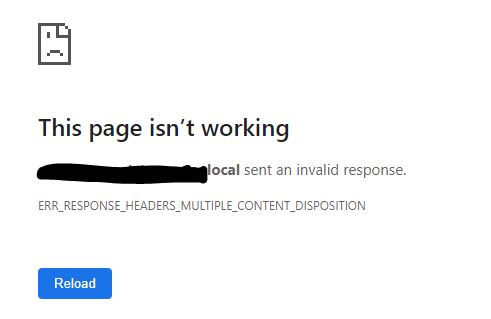
I had an Oracle Apex application error reported by a few users that were unable to view a file loaded into one of the applications. Originally it only appeared to be PNG files that were affected but later it was clear that it impacted any type of file. When you clicked to view/download the file that had been stored as a Clob in Oracle there was an error page shown with the message
<ServerName> sent an invalid response.
ERR_RESPONSE_HEADERS_MULTIPLE_CONTENT_DISPOSITION
On further investigation it appears this is a known issue with Google Chrome and not a specific Oracle Apex error. There are various characters that can cause the error if they exist in the file name of the file you are handling such as commas, quotes etc.
I've now put a DB trigger to rename any files to remove characters that could cause a problem so that users don't need to worry about renaming themselves.
Tuesday, 12 January 2021
Adobe Flash EOL Fix Blocked Applications Jan 12 2021
Adobe Flash was made End of Life (EOL) at the end of December 2020 but Adobe gave users a short period of grace until turning the product off on 12 January 2021. As of today any websites will no longer be able to play Adobe Flash content as it is blocked by Adobe.
You can view a video of the steps here
However there is a way to still run Flash applications if you have access to Internet Explorer 11 and haven't applied the patch to remove Flash (KB4577586) We have successfully used this method to reactivate one of our applications that relied on Flash based graphs and had stopped working on Jan 12 but users are now able to access again. Bear in mind this should only be a temporary fix until you can rewrite the code, using Flash is not a long term solution. You need to create a file called MMS.cfg. Within the file you need to specify the domain and port that your flash application is running on, for example https://https://www.bbc.co.uk/:80. This is the website/domain for your website that you need to enable flash to work on.
Monday, 14 December 2020
Oracle Apex Form Download File link error - Server sent an invalid response.
I had the following problem reported by a user of one of my Apex applications when they were trying to download an attachment that had been added to a record as a clob using the built in functionality for Apex clob form fields. The error message wasn't very informative and gave "server name sent an invalid response."
The issue seemed to be that the file name the user was adding included commas in it which is obviously allowed in Windows but maybe not in other system processes. Once I removed the commas the download worked fine again.
In order to remove unwanted characters in file names I added the following code to the insert trigger on the table to automatically update them
-- Check and update Filename remove unwanted characters
--*****************************************************************************
:NEW.FILE_NAME := REPLACE ( REPLACE ( REPLACE ( :NEW.FILE_NAME, CHR(44), NULL ), CHR(59), NULL ), CHR(39), NULL ) ;
| Oracle Apex Form Download File link error - Server sent an invalid response. |
Monday, 7 December 2020
SecureDoc Password Different Windows 10 After Change
SecureDoc is used to protect laptops so that the disc is encrypted before logging into the operating system. I have Windows 10 on my laptop and normally it's a seamless process to log in where you enter your credentials to SecureDoc on startup and this automatically logs you in to Windows.
However there seems to be an issue when Windows requires a password change and SecureDoc doesn't seem to be able to cope with this so you end up with the situation of needing a different password for SecureDoc to the one used for Windows and need to enter 2 different passwords.
The SecureDoc website is useless for finding information about this and doesn't have any support info - I guess because they expect support to be done by company helpdesks.
The answer seems to be to log in to the SecureDoc control center on your laptop once it has booted into the Operating System. Select the menu option to Communicate with Server and this appears to resync the password between Windows and SecureDoc. I don't know if the same process works for MacOS but it might be worth a try if you find that your password no longer matches SecureDoc.
Sunday, 22 November 2020
IOCrest SATA 6g Host Controller Not working - Hard Drives not showing
For ages I've had an IO Crest 8 channel PCI-Express SATA (Serial ATA) host controller card that I've been unable to get fully working on my PC so it would allow the additional hard drives I'd got connected to it to be visible. There were a few suggestions online but nothing seemed to work and some posts had suggested the card was unlikely to function properly for various reasons so I'd not dug further into it.
I finally decided to give it another go and to look for new drivers. The driver CD that came with the card didnt have anything of use on it - not sure if it was the wrong CD but it had video software nothing to do with this card. It seemed that the card had Marvell chipsets on it so had a look on their website which was utterly useless and gave no information.
I then stumbled on a very informative post here https://www.tenforums.com/drivers-hardware/60112-marvell-92xx-sata-controller-6gb-driver-windows-10-1-2-0-1039-whql.html which gave some details of a site that had the drivers as well as the right driver to install.
Downloaded and installed - bingo - suddenly the missing drives all pop up in Windows explorer so I've now got it all working.
The website with the drivers on is https://www.evga.com/support/download/
The Marvell driver to look for is with the Intel Z87 motherboard, FTW part number. Select Sata 3G/6G and then the relevant Operating System.
Download and extract the files and a folder called 1.2.0.1039-WHQL will be created. Run the drvsetup.exe file and the drivers will be added to your system.
Once done you will see the following in the Control Panel Device manager and hopefully a bunch of disks if you have any attached.
Tuesday, 28 July 2020
Garmin Forerunner 45 Not Showing or Recording Distance Since Hack July 2020
Tuesday, 25 February 2020
Strava Sony Smartwatch3 Data Sync Fails - How to Fix
I've now got a new Android phone and am looking to sell my old phone so need to get another way to load the Strava data from my Sony Smartwatch to Strava online. I've found a great website that maintains old copies of the Android Strava app where I am able to obtain a copy of v20 of Strava.
https://strava.en.uptodown.com/android/versions
Luckily I have a very old phone that I'm able to install Strava on and use that purely for loading my activity from my Smartwatch up to Strava. I can then use my new Android phone with the latest version of Strava to view my activity and those of my friends - the old version 20 no longer shows any activity on the phone but still syncs the data from the Smartwatch in the back ground.
So if you want to continue to use Strava on your Smartwatch I'd recommend using the link above to get v20 of the Strava app to load to your phone which will continue to sync your data.
Friday, 11 October 2019
Printing Clob Attachments from Oracle Database Along with Report Data
Looking online there doesn't seem to be much in the way of options for being able to use a single tool to produce a report that includes rows of data from an Oracle table along with CLOB or BLOB data in a single place.
However one idea came to mind when I was talking through options with colleagues. We already have the facility within the Apex system for a user to email themselves a copy of a specific record with any linked data. If it was possible to add the Clob attachments to this email then it would give a way to be able to print them.
Within Microsoft Outlook there is the ability to print an email and one slightly hidden option is to also print all attachments. The main print screen is below.
| Printing Clob Attachments from Oracle Database |
| How to print clobs in report with Oracle data |
You will see a message asking if you want to open the program that processes each attachment type - answer Ok and the print is generated. You don't even see the program opening, the print is just generated. The print jobs will be sent directly to the printer and be held for printing by the user or print immediately depending on your print server setup.
To generate the email from the Oracle database we're using the Apex_Mail PROCEDURE which is part of the standard Oracle UTL_SMTP toolkit that has lots of documentation online.
https://docs.oracle.com/database/121/AEAPI/apex_mail.htm#AEAPI341
You can use theAPEX_MAILpackage to send an email from an Oracle Application Express application. This package is built on top of the Oracle suppliedUTL_SMTPpackage. Because of this dependence, theUTL_SMTPpackage must be installed and functioning to use APEX_MAIL.APEX_MAILcontains three procedures. UseAPEX_MAIL.SENDto send an outbound email message from your application. UseAPEX_MAIL.PUSH_QUEUEto deliver mail messages stored inAPEX_MAIL_QUEUE. UseAPEX_MAIL.ADD_ATTACHMENTto send an outbound email message from your application as an attachment.
So the process to print a report from Oracle that includes table data as well as PDF, XLS, DOC or other attachments stored as Clobs is below:
- Generate email from Oracle Apex
- Add attachments to email
- Send email
- Use Outlook to print email and all attachments
An improvement/variation on this would be to include the Oracle table data in a PDF as an attachment to the email rather than being in the email body. This would allow you to control the layout and format of the table data more closely and avoid the email headers being shown.
If you have any questions, comment or feedback please post below
Wednesday, 17 October 2018
OpenHabian Raspberry Pi 3 Installation Failure Error
However it appears that OpenHabian is very susceptible to voltage fluctuations during the installation process and if there is any slight drop it can cause the process to fail giving an error in the package installer but not making any mention of the voltage being the cause. The only sign that there may be an issue was when I connected the Pi to my TV monitor to view the install and noticed the yellow power symbol flash on screen a few times.
After seeing this error I downloaded the image onto a fresh SD card and started the installation again but this time using my mobile battery charger with 2A output. The installation completed flawlessly and I now have a fully working OpenHabian install ready to use!
Monday, 19 March 2018
Question From eBay Member - Email Virus Malware
Hello Your ad is posted twice . Which is the right price ?Is this your product?
The link below the question appears to be eBay but if you hover over (don't click!) then you'll see that the URL isn't the same as the link text. The link is to a compromised site so that when you click your PC will be infected with malware that can steal bank details or be controlled remotely.
This was quite an effective attack as I do currently have eBay listings running at the moment but fortunately the email came in on an account that isn't linked to eBay and all eBay emails come from them not the third party who has the question.
Tuesday, 20 December 2016
Company Investigations Inquiry Notice Email Scam
| Company Investigations Inquiry Notice Email Scam |
Email details below:
- Causing significant harm to customers, suppliers, etc.
- Breaking the law, e.g. double-dealing
- Serious misbehavior, e.g. company assets have not been used properly
- Having a notable impropriety in its affairs.
Tuesday, 13 December 2016
Notice of Intended Prosecution (NIP) Speeding Ticket by Email Fake or Real?
- Does the email claiming to be a Notice of Intended Prosecution (NIP) show the vehicle registration?
- Does the email claiming to be a Notice of Intended Prosecution (NIP) show the Registered Keeper Name?
A Notice of Intended Prosecution has to be linked to a vehicle and a Registered Keeper so these emails can be deleted as spam.
If you have clicked the link on the email then I'd recommend using a virus scanner on your PC as you are likely to have infected your machine with a virus or Trojan.
| Fake Notice of Intended Prosecution (NIP) Email |
Thursday, 8 December 2016
Manchester Police Speeding NIP Email Scam Virus - Notice of Intended Prosecution
The latest email virus scam/spam purports to be from Greater Manchester Police and to be a speeding ticket titled Notice of Intended Prosecution - M24181
In accordance with Section 1 of the Road
Traffic Offenders Act 1988. we hereby inform you that it is mandatory to take
proceedings against the driver of motor vehicle.There is a link in the email to view the photo which will be a virus that infects your machine if you click the link. Opening the email itself should not harm your machine but you should delete the email. Remember: UK Police DO NOT send speeding tickets known as Notice of Intended Prosecution (NIP) by email. The email also has no vehicle details included despite claiming to have detailed information about the location of the alleged offence. =============================================================== Notice of Intended Prosecution (NIP) Information Greater Manchester Police Details of the Violation
·
Time
& Date: at 18:56 on 30/11/2016
·
Fixed Speed Camera UIN: 1WJT2
·
Location: A560 Hyde Road, near Wyecroft Close, Stockport
·
Violation: EXCEED 25 MPH SPEED LIMIT
·
Vehicle Speed: 85
We
have photographic data that the driver of motor vehicle failed to comply with
a speed limit at the date, time and location.
You have been announced as driver of the vehicle at the time of the
supposed offence and have a legal obligation to comply with the provisions of
the notice.
|
Check The Photographic Proof
|
Whether
you agree with the NIP or not you have to fill out the section 172 notice
declaring who was driving the car at the time of the offence within 28 days.
The NIP with the section 172 notice were sent to your mailing address
|
Friday, 25 November 2016
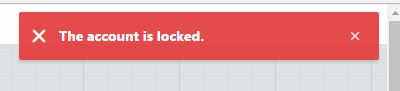
Oracle Apex Admin Password Locked - How to Unlock/Reset Apex User Account
| Oracle Apex admin account locked |
| How to Unlock/Reset Apex User Account |
| Oracle apex WWV_FLOW_FND_USER reset account |
FAILED_ACCESS_ATTEMPTS to 0 (zero).
| ACCOUNT_LOCKED, FAILED_ACCESS_ATTEMPTS |
Thursday, 24 November 2016
Met Police Crime Prevention Advice - Scam Phishing Email
Beware of new email titled Crime Prevention Advice which contains a malware attachment that will infect your PC with a key logger
Received from the fake email address crime@content.met.police.uk and containing the subject line ‘Crime Prevention Advice’, the email asks readers to open the attached file to learn more.
Intelligence suggests that if the attachment is opened, iSpy key logger malware is downloaded onto the host device. The malware has the potential to capture keystrokes, steal passwords stored in web browsers among other malicious activities.
Other phishing emails to watch out for include:
• those from a ‘delivery company’ about an expected order which is delayed or held at the depot
• a bogus order tricking you to confirm or cancel it
• a fake ‘invoice’ attached for a recent order
• warnings or advice from the Police such as our example
| Crime Prevention Advice Scam Email |
Wednesday, 27 April 2016
Data Security & Patching - Advice for Dictators
With all the news about the Panama Papers I thought this article was an interesting take on data security and how not to do it, all from the viewpoint of a dictator trying to stash their millions. For the rest of us there are still some useful lessons about how to keep our data secure and away from hackers.
http://www.zdnet.com/article/three-important-lessons-crooked-world-leaders-can-learn-from-the-panama-papers/
The bottom line is patch, patch and patch again. Make sure you always keep your software up to date with the latest patches and install updates when there are any security alerts. For most of us all might happen is that someone could have access to our data or hack your email/social media but potentially you could lose money from fraud on your bank account or lose important personal data like photos if your phone or PC is at risk from unpatched security flaws.
If your PC or phone prompts to install new security updates then it's always worth making sure you take the time to apply them. From an IT perspective it may be a pain when systems need to be taken down to apply updates but there is good reason for keeping software fully patched as this shows!