Friday, 14 November 2014

Whos Heart 2014 - Last Voice Guessed as Nigel Kennedy

Whos on Heart 2014 has now been won with the final voice identified as Nigel Kennedy the classical violinist. The last voice has taken nearly 12 months to identify but the winner now gets a fantastic £100,000!

The other voices from Whos on Heart 2014 were Stevie Nicks and Ben Miller

Whos = Ben Miller
On = Stevie Nicks
Heart = Nigel Kennedy


Whos Heart 2014 Last Voice Nigel Kennedy

Winshock Microsoft Windows Bug Patch - Old Windows Vulnerability Revealed

New Windows bug/vulnerability revealed called Winshock. This has been present in all versions of Windows since Windows95.

Nicknamed WinShock (like BASH that was nick named ShellShock), it is rated 9.3 on the CVSS (Common Vulnerability Scoring System) vulnerability scale.  However, there is no proof of concept code yet to show how it can be exploited.
Winshock Microsoft Windows Bug Patch - Old Windows Vulnerability Revealed

I was made aware of this yesterday - Microsoft released a number of patches which are already being released to home PCs via the Windows Update process.

Interestingly when I googled WinShock, Google automatically thought you meant WinSock (which is a communications protocol), and you have to tell it you actually mean WinShock.

Link to BBC News story

Microsoft patches '19-year-old' bug.  Microsoft patches a critical bug in its software that had existed for 19 years, according to IBM researchers. Read more:

Thursday, 13 November 2014

Date_Diff Error - Gives Negative Values for SAP Data Services 4.2 (BODI 14.2.2/14.2.3) Chan

Date_Diff problem with SAP BODI Data Services 4.2 - 14.2/14.2.2/14.2.3 (BI Business Objects)

I've found a problem with the values being output in one of my Data Services jobs where date diff was reporting negative numbers. This function compares dates against each other to display an elapsed time.

 Yesterday we upgraded our Data Services to BI4.2 (internally shown as BI 14.2.3) and this has affected jobs using date_diff since the upgrade.

It appears that SAP have changed the function date_diff in  Data Services 14.2.2 (BI4.2) so the date inputs are reversed which means it now gives negative numbers.
 
The date_diff function compares date1 and date2

 Originally date1 was the later date (end date) and date2 was earlier (start date). As of Data Services 4.2.2 (14.2.2) the first date is the earlier date and date2 was later
 
Prior to Data Services 14.2.2 the date_diff function works as below:
 
date_diff(end_date, start_date)
 
After Data Services 14.2.2 the date_diff function works like this:
 
date_diff(start_date, _end_date)

This may bring SAP Data Services into line with other products but it really needs to be highlighted to customers as it will break any data services job using date_diff in a job after you upgrade to BODI BI 4.2 or SAP version 14.2.2 or higher

See P41 in the attached document from SAP

Tuesday, 4 November 2014

SAP Data Services Date_Diff Function

The Data Services date_diff function compares date1 and date2

 Originally date1 was the later date (end date) and date2 was earlier (start date). As of Data Services 4.2.2 (14.2.2) the first date is the earlier date and date2 was later


SAP Data Services Date_Diff Function error problem in BODS 4.2
SAP Data Services Date_Diff Function error problem in BODS 4.2 
 
Prior to Data Services 14.2.2 the date_diff function works as below:
 
date_diff(end_date, start_date)
 
After Data Services 14.2.2 the date_diff function works like this:
 
date_diff(start_date, _end_date)

This may bring SAP Data Services into line with other products but it really needs to be highlighted to customers as it will break any data services job using date_diff in a job after you upgrade to BODI BI 4.2 or SAP version 14.2.2 or higher

See P41 in the attached document from SAP

Friday, 17 October 2014

Internet Explorer IE9 Unable to Display Page After Microsoft Updates Oct 2014 (Internet Explorer can not display the website)

After updating to install the latest critical updates and patches from Microsoft I found that my Internet Explorer browser gave the message:

  Internet Explorer can not display the website

There were a number of Critical patches affecting Internet Explorer released in October 2014 as part of their routine Patch Tuesday monthly update cycle so one of these fixes must have affected the way Internet Explorer works as other people have had the same error message.

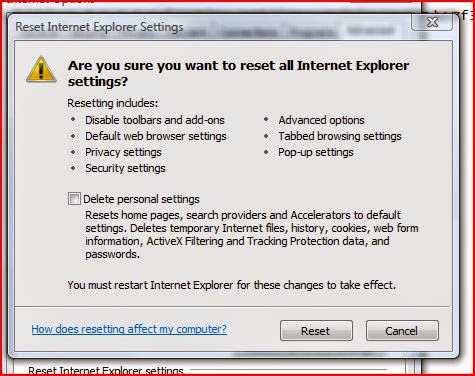
Browsing the web with Google Chrome was fine yet all IE9 tabs were showing the same message and unable to display the website. The solution was to reset Internet Explorer settings. 

Click on the Cog icon or Tools - Internet Options then the Advanced tab and at the bottom click on the RESET button. 


You'll get a warning but make sure you don't click/tick the Delete Personal Settings box or you'll lose your favourites and bookmarks. Leaving it unticked means they will be retained.

Internet Explorer can not display the website
Once you have reset you should fine that Internet Explorer can now display pages and websites correctly without the error message being shown.

Tuesday, 14 October 2014

Microsoft Critical Patch Updates - Oct 2014 - Remote Code Execution

There are some very serious Microsoft critical patches that are being released on 14 Oct 2014. These affect all versions of Windows including presumably Windows XP that is no longer being patched.


Bulletin IDMaximum Severity Rating and Vulnerability ImpactRestart RequirementAffected Software
Bulletin 1Critical
Remote Code Execution
Requires restartMicrosoft Windows,
Internet Explorer
Bulletin 2Critical
Remote Code Execution
May require restartMicrosoft Windows,
Microsoft .NET Framework
Bulletin 3Critical
Remote Code Execution
Requires restartMicrosoft Windows
Bulletin 4Moderate
Elevation of Privilege
May require restartMicrosoft Windows,
Microsoft Office
Bulletin 5Important
Remote Code Execution
May require restartMicrosoft Windows
Bulletin 6Important
Remote Code Execution
May require restartMicrosoft Office,
Microsoft Office Services,
Microsoft Office Web Apps
Bulletin 7Important
Elevation of Privilege
Requires restartMicrosoft Windows
Bulletin 8Important
Elevation of Privilege
Requires restartMicrosoft Windows
Bulletin 9Important
Security Feature Bypass
May require restartMicrosoft Developer Tools


https://technet.microsoft.com/library/security/ms14-oct

Tuesday, 23 September 2014

Crystal Reports 2008 Embedded database login - CMC Asks for User Password Running Report

Can you set an embedded database login for Crystal Reports 2008 when running via Business Objects CMC?


This can be done through CMC when logged in as Admin. Select the report and then right click and select Database Configuration. Set the DB, user and password and any other changes and save it.

Crystal Report will then run without asking for user credentials and database login/password.